Freeform Diagrams
A freeform diagram is made of shapes, icons, groups, text and connectors that you place and style yourself, so it can take whatever form the content needs – an architecture diagram, an org chart, a roadmap, a wireframe.
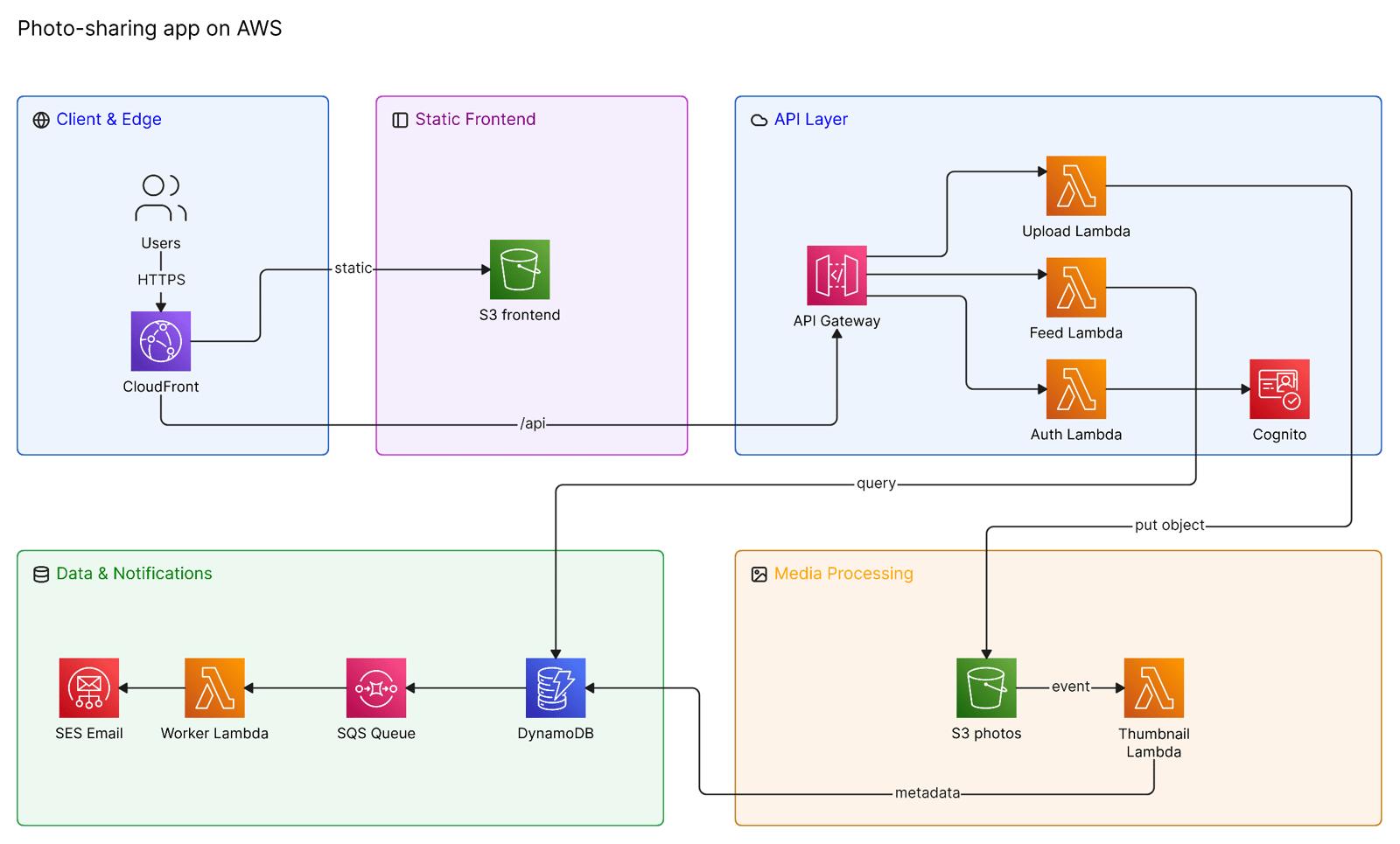
AI creates architecture diagrams and flowcharts as freeform unless your team has chosen otherwise – see Diagram format. For more, see the examples.
Creating a freeform diagram
- Insert menu – press
/on the canvas and choose Freeform to start from a starter diagram. - AI chat – describe the diagram. Architecture diagrams, flowcharts, timelines, org charts, wireframes and Gantt charts come out as freeform. To be sure, ask for freeform.
- Paste – paste freeform JSON or XML onto the canvas.
- Drop a file – drop a
.drawioor.eraserdiagramfile onto the canvas.
Editing
Select an element to style it from the property bar – for a connector, that includes its arrowheads and routing: elbow, straight or arc. Dividers can be drawn at any angle; to curve one, drag the handle at its middle. To change the diagram with AI, select it and describe the change in AI chat.
Verify in a diagram’s toolbar checks it against your models and standards – see Verifying diagrams.
Styling
Custom styles have the most effect on freeform diagrams: a style’s defaults fill in whatever an element doesn’t set itself.
Copying, exporting and syncing
- Copy as JSON / Copy as XML – under Copy/Paste As in the property bar’s … menu. Paste the result onto any canvas to make a copy.
- Export – PNG, SVG and PDF, plus Visio, draw.io and PowerPoint. See Export.
- Git sync – a freeform diagram syncs as an
.eraserdiagramfile holding its JSON. See Git sync.
Freeform and diagram as code
| Freeform | Diagram as code | |
|---|---|---|
| Editing | On the canvas, or with AI | In the code editor, or with AI |
| Layout | Wherever you place things | Automatic, from the code |
| Stored as | JSON | Eraser DSL |
| Types | Anything you can draw | Architecture, flow chart, ERD, sequence, BPMN |
Converting to freeform
Select an architecture diagram or flowchart written in code, open the … menu in the property bar, and choose Convert to freeform. Eraser adds a freeform copy and keeps the original.
Diagram format
The Diagram Format team setting decides whether AI creates architecture diagrams and flowcharts as Freeform (the default) or Code (DSL). Team admins change it on the Team Settings page.
What freeform doesn’t draw
Database tables, legends, pools and lanes don’t render in a freeform diagram. Use an entity relationship diagram for tables and a BPMN diagram for pools and lanes.