Freeform JSON format
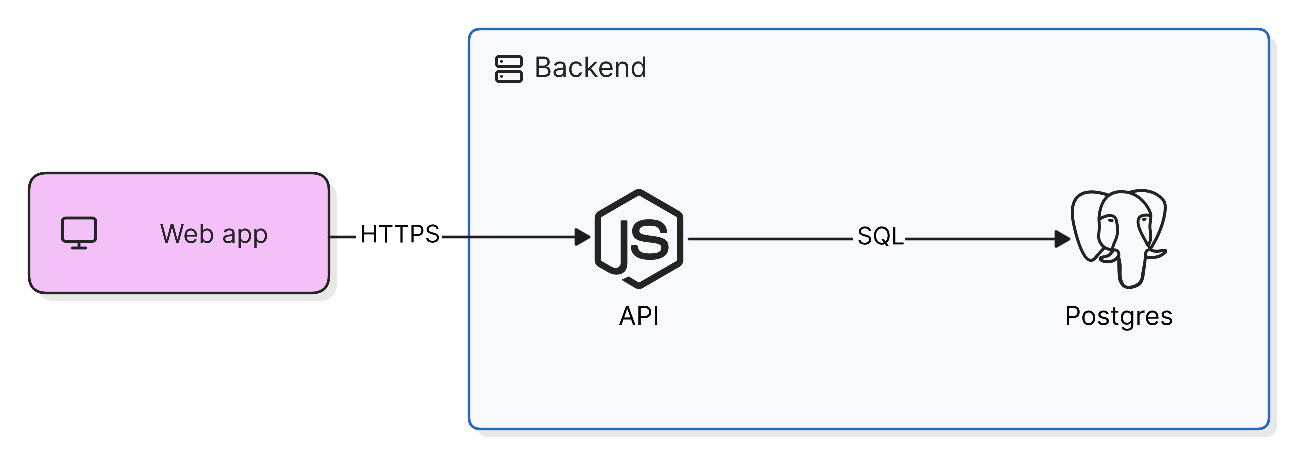
A freeform diagram is stored as JSON – a title and a flat list of elements. It is what Copy as JSON gives you, what git sync writes to .eraserdiagram files, and what you paste onto the canvas or send to the API or MCP server to create a diagram without AI.
{
  "title": "Checkout",
  "elements": [
    { "tag": "Shape", "id": "web", "shape": "rectangle",
      "x": 0, "y": 72, "width": 150, "height": 60,
      "color": "purple", "icon": "monitor",
      "texts": [{ "text": "Web app" }] },
    { "tag": "Group", "id": "backend",
      "x": 220, "y": 0, "width": 400, "height": 200,
      "color": "blue",
      "title": { "text": "Backend", "icon": "server" } },
    { "tag": "Icon", "id": "api", "icon": "node", "size": "md",
      "x": 280, "y": 80, "containerId": "backend",
      "texts": [{ "text": "API" }] },
    { "tag": "Icon", "id": "db", "icon": "postgres", "size": "md",
      "x": 520, "y": 80, "containerId": "backend",
      "texts": [{ "text": "Postgres" }] },
    { "tag": "Relationship", "from": "web", "to": "api",
      "label": "HTTPS" },
    { "tag": "Relationship", "from": "api", "to": "db", "label": "SQL" }
  ]
}
Elements
Every element has a tag. Shapes, icons, text, groups and dividers also need an id and an x and y – the top-left corner, in pixels. width and height are optional. A connector joins two elements by their ids in from and to.
| Tag | Draws |
|---|---|
Shape | A shape with text and an optional icon. shape is rectangle, oval, circle, ellipse, diamond, hexagon, parallelogram, trapezoid, triangle, cylinder, document or star. |
Icon | An icon with a caption. size is sm, md, lg or xl. |
Textbox | Standalone text, in Markdown. |
Group | A container with an optional title. An element joins it by setting containerId to the group’s id. |
Divider | A line with an optional label, at any angle or curved – see Dividers. |
Relationship | A connector, with an optional label. |
Dividers
A divider runs from start to end, each an [x, y] point. bend curves it into an arc, in pixels – negative values curve the other way.
{ "tag": "Divider", "id": "trust-boundary", "x": 300, "y": 0,
  "start": [300, 0], "end": [300, 320], "bend": 60,
  "label": "Trust boundary", "lineStyle": "dashed", "color": "red" }
Older JSON using orientation still works.
Common properties
| Property | Value |
|---|---|
texts | The text on a shape or icon, one entry per line: [{ "text": "API" }] |
icon | An icon name from Icons |
color | white, yellow, green, blue, purple, red, orange, black, or any CSS color |
startArrowhead, endArrowhead | arrow, bar, dot, triangle, crowFootSingle, crowFootMany, or null for none |
lineStyle | solid, dashed or dotted |
connectorStyle | elbow (the default), straight or arc |
The quickest way to see any other property is to style an element on the canvas and use Copy as JSON.
Using the JSON
- Canvas – paste the JSON onto the canvas to create the diagram.
- Git sync – an
.eraserdiagramfile is the linefreeform-diagram, a blank line, then the JSON. - API – send the elements as
freeformElementsto/api/render/elements, withdiagramTypeset tofreeform-diagram. - MCP – pass the JSON as
codetomanually_create_diagram, withdiagramTypeset tofreeform-diagram.