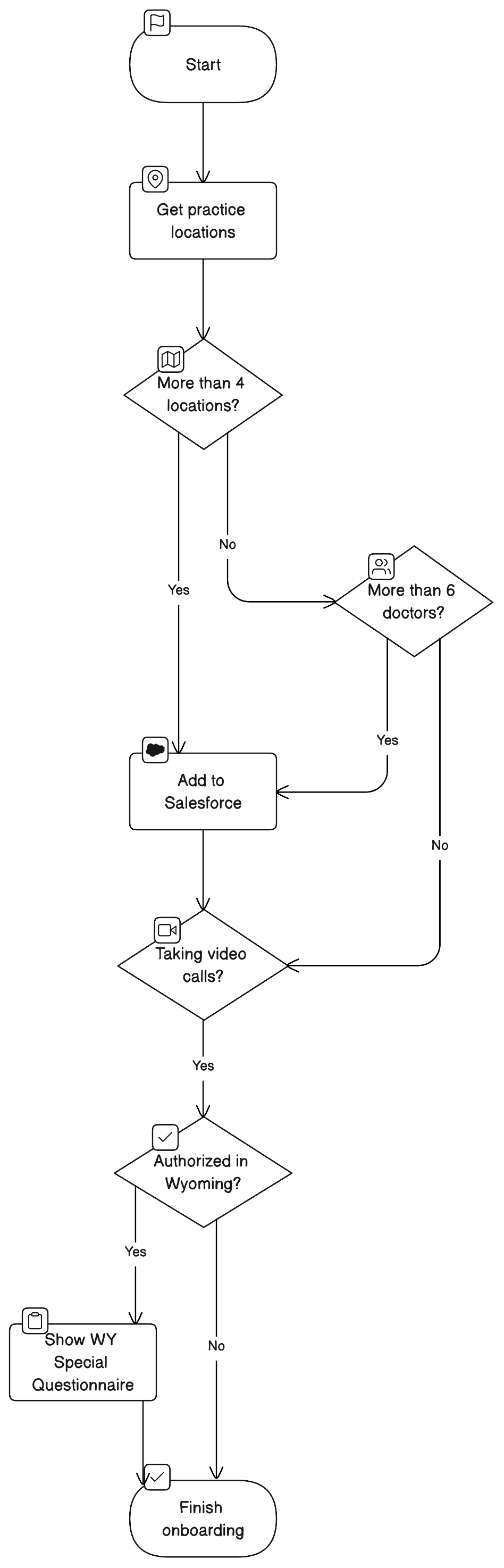
AI diagrams
What are AI diagrams?
Eraser can generate stunning diagrams in seconds using AI.
- The user input can be any text that represents a diagram – usually natural language or a code snippet.
- The output is a diagram you can edit by hand or with further AI prompts. Architecture diagrams and flowcharts are freeform diagrams unless your team’s diagram format is Code (DSL); the other types are diagram-as-code.
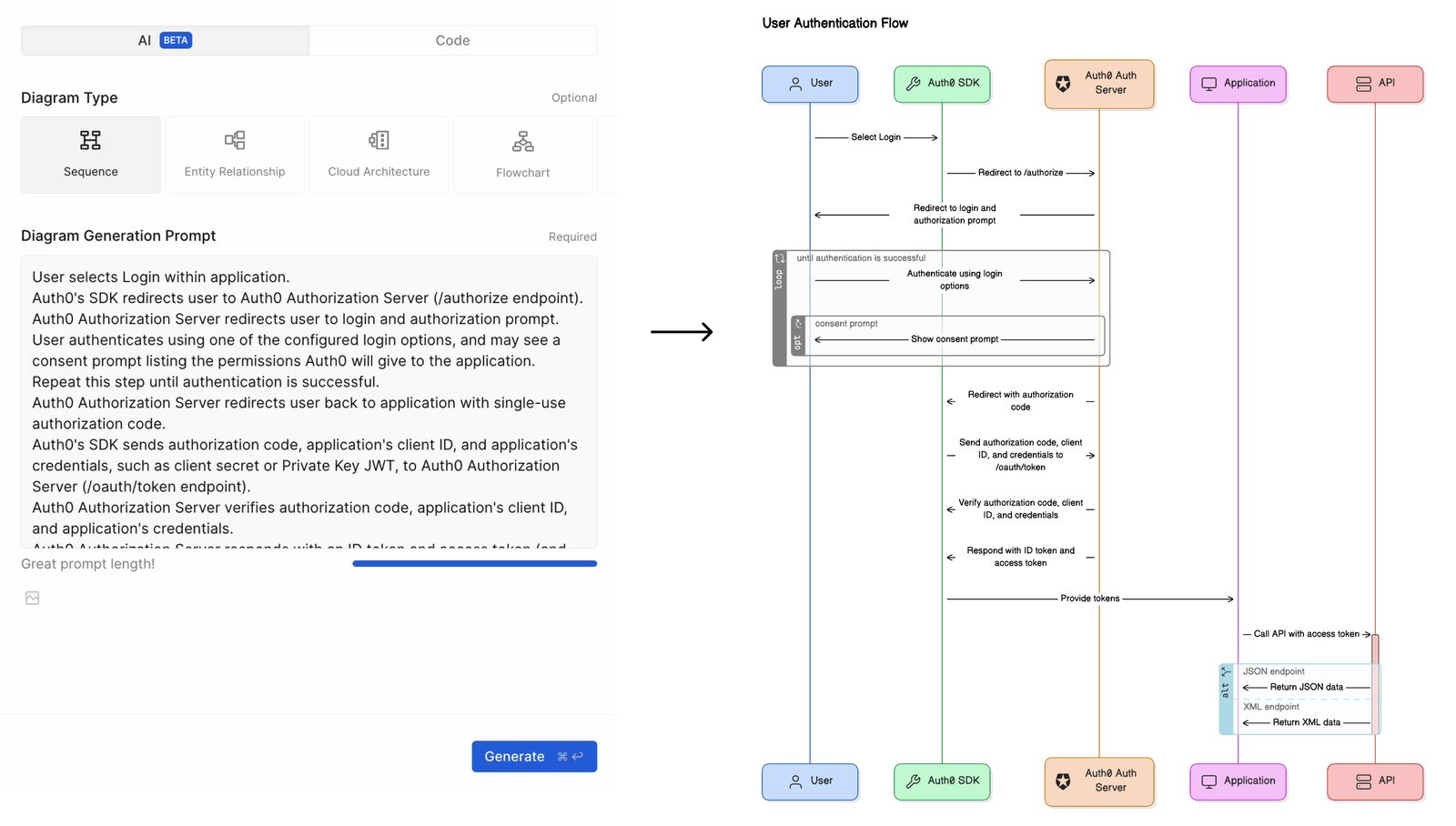
How to create an AI diagram
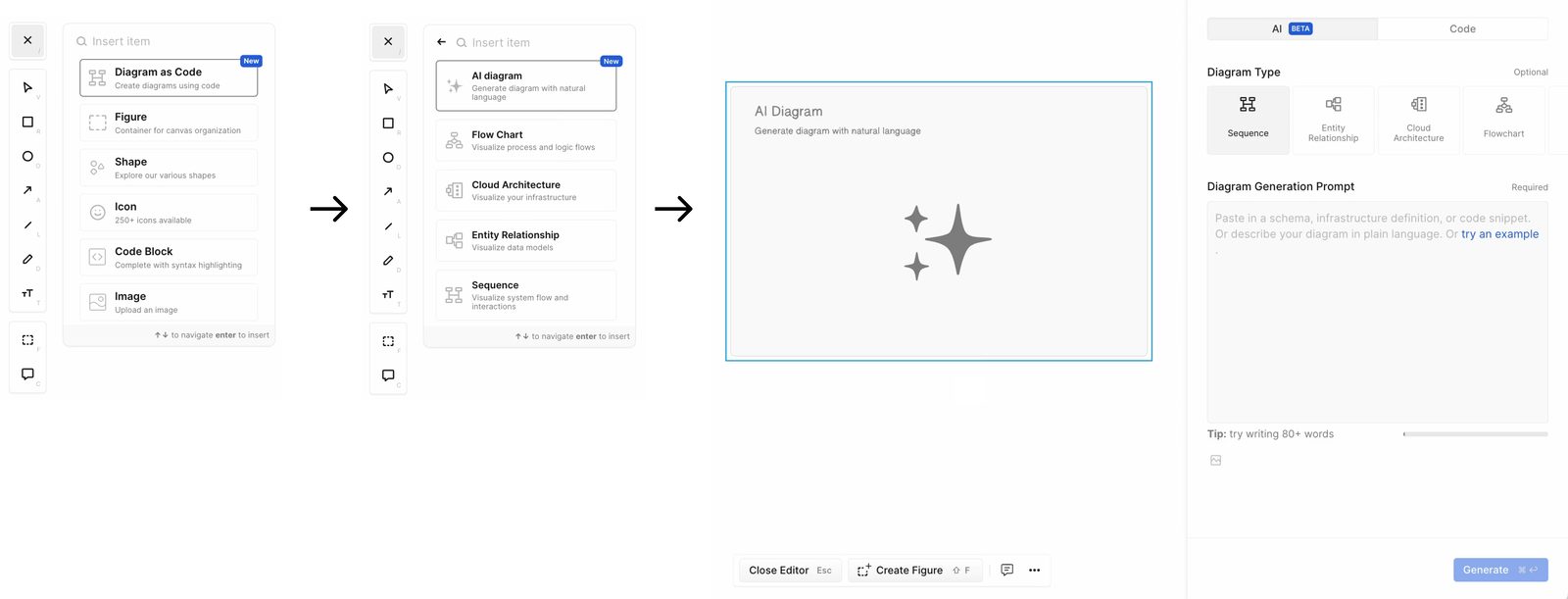
- In the canvas, open the insert menu (or press
/). - Select Diagram as Code then AI Diagram (or press
⌘/Ctrl+J). - Enter prompt using natural language or code snippet.
- (Optional) Select diagram type.
- Click “Generate”.
Selecting a diagram type
Users can optionally select a diagram type manually. If not selected, Eraser AI will automatically choose the most suitable diagram type for the provided input.

The possible diagram types are the same as what is available in diagram-as-code:
- Sequence Diagrams
- Entity Relationship Diagrams
- Cloud Architecture Diagrams
- Flow Charts
Generating a diagram from a file
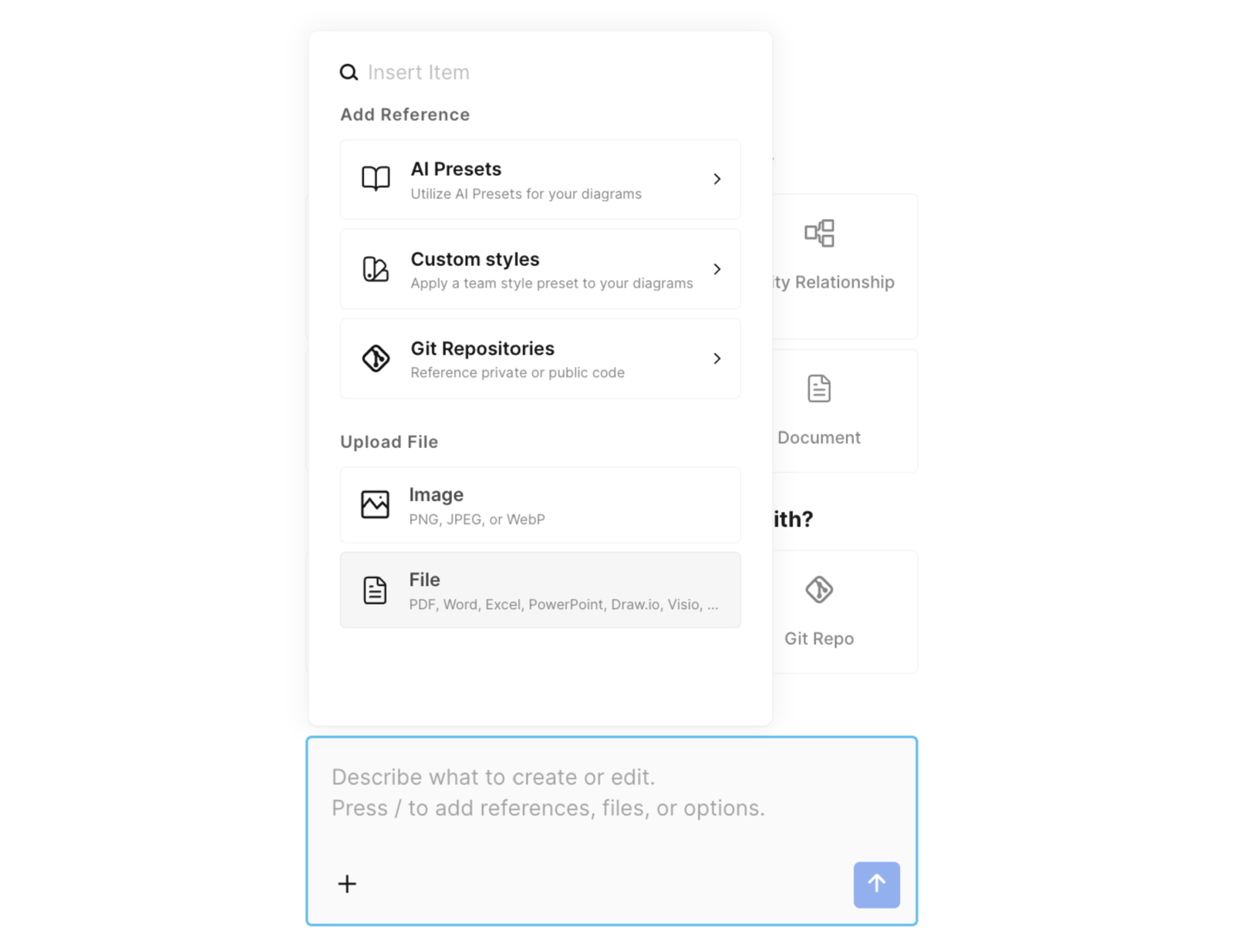
To attach a file, press / in an empty prompt and choose Image or File, or drag it in. See File-to-diagram for supported types.
Examples
Here are some examples of diagrams you can create using AI diagrams.
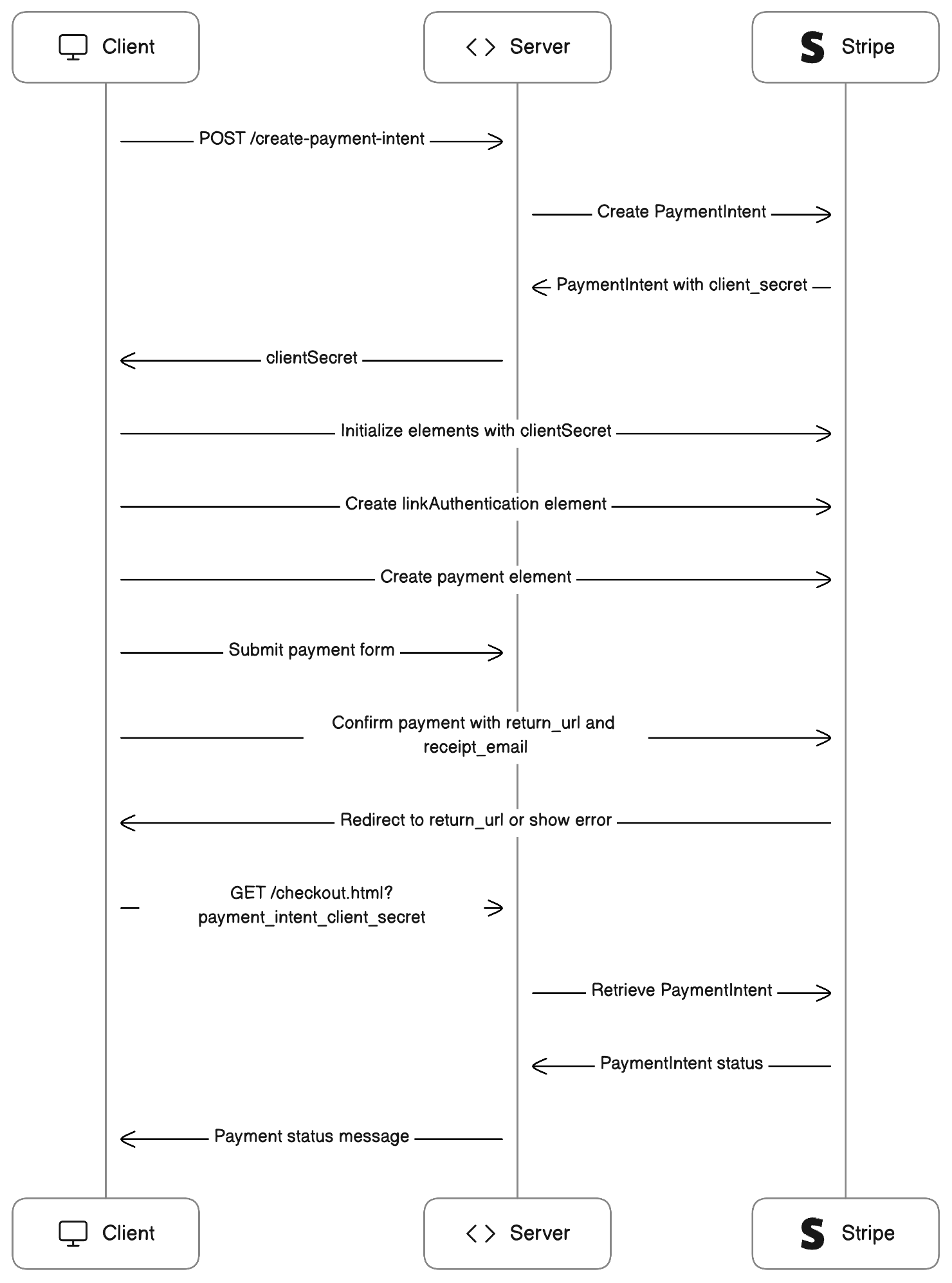
Stripe payment flow
// Source: https://stripe.com/docs/payments/quickstart

// server.rb

require 'sinatra'
require 'stripe'
# This is a public sample test API key.
# Don’t submit any personally identifiable information in requests made with this key.
# Sign in to see your own test API key embedded in code samples.
Stripe.api_key = 'sk_test_4eC39HqLyjWDarjtT1zdp7dc'

set :static, true
set :port, 4242

# Securely calculate the order amount
def calculate_order_amount(_items)
  # Replace this constant with a calculation of the order's amount
  # Calculate the order total on the server to prevent
  # people from directly manipulating the amount on the client
  1400
end

# An endpoint to start the payment process
post '/create-payment-intent' do
  content_type 'application/json'
  data = JSON.parse(request.body.read)

  # Create a PaymentIntent with amount and currency
  payment_intent = Stripe::PaymentIntent.create(
    amount: calculate_order_amount(data['items']),
    currency: 'usd',
    automatic_payment_methods: {
      enabled: true,
    },
  )

  {
    clientSecret: payment_intent['client_secret']
  }.to_json
end

// checkout.html

<!DOCTYPE html>
<html lang="en">
  <head>
    <meta charset="utf-8" />
    <title>Accept a payment</title>
    <meta name="description" content="A demo of a payment on Stripe" />
    <meta name="viewport" content="width=device-width, initial-scale=1" />
    <link rel="stylesheet" href="checkout.css" />
    <script src="https://js.stripe.com/v3/"></script>
    <script src="checkout.js" defer></script>
  </head>
  <body>
    <!-- Display a payment form -->
    <form id="payment-form">
      <div id="link-authentication-element">
        <!--Stripe.js injects the Link Authentication Element-->
      </div>
      <div id="payment-element">
        <!--Stripe.js injects the Payment Element-->
      </div>
      <button id="submit">
        <div class="spinner hidden" id="spinner"></div>
        <span id="button-text">Pay now</span>
      </button>
      <div id="payment-message" class="hidden"></div>
    </form>
  </body>
</html>

// checkout.js

// This is a public sample test API key.
// Don’t submit any personally identifiable information in requests made with this key.
// Sign in to see your own test API key embedded in code samples.
const stripe = Stripe("pk_test_TYooMQauvdEDq54NiTphI7jx");

// The items the customer wants to buy
const items = [{ id: "xl-tshirt" }];

let elements;

initialize();
checkStatus();

document
  .querySelector("#payment-form")
  .addEventListener("submit", handleSubmit);

let emailAddress = '';
// Fetches a payment intent and captures the client secret
async function initialize() {
  const response = await fetch("/create-payment-intent", {
    method: "POST",
    headers: { "Content-Type": "application/json" },
    body: JSON.stringify({ items }),
  });
  const { clientSecret } = await response.json();

  const appearance = {
    theme: 'stripe',
  };
  elements = stripe.elements({ appearance, clientSecret });

  const linkAuthenticationElement = elements.create("linkAuthentication");
  linkAuthenticationElement.mount("#link-authentication-element");

  linkAuthenticationElement.on('change', (event) => {
    emailAddress = event.value.email;
  });

  const paymentElementOptions = {
    layout: "tabs",
  };

  const paymentElement = elements.create("payment", paymentElementOptions);
  paymentElement.mount("#payment-element");
}

async function handleSubmit(e) {
  e.preventDefault();
  setLoading(true);

  const { error } = await stripe.confirmPayment({
    elements,
    confirmParams: {
      // Make sure to change this to your payment completion page
      return_url: "http://localhost:4242/checkout.html",
      receipt_email: emailAddress,
    },
  });

  // This point will only be reached if there is an immediate error when
  // confirming the payment. Otherwise, your customer will be redirected to
  // your `return_url`. For some payment methods like iDEAL, your customer will
  // be redirected to an intermediate site first to authorize the payment, then
  // redirected to the `return_url`.
  if (error.type === "card_error" || error.type === "validation_error") {
    showMessage(error.message);
  } else {
    showMessage("An unexpected error occurred.");
  }

  setLoading(false);
}

// Fetches the payment intent status after payment submission
async function checkStatus() {
  const clientSecret = new URLSearchParams(window.location.search).get(
    "payment_intent_client_secret"
  );

  if (!clientSecret) {
    return;
  }

  const { paymentIntent } = await stripe.retrievePaymentIntent(clientSecret);

  switch (paymentIntent.status) {
    case "succeeded":
      showMessage("Payment succeeded!");
      break;
    case "processing":
      showMessage("Your payment is processing.");
      break;
    case "requires_payment_method":
      showMessage("Your payment was not successful, please try again.");
      break;
    default:
      showMessage("Something went wrong.");
      break;
  }
}

// ------- UI helpers -------

function showMessage(messageText) {
  const messageContainer = document.querySelector("#payment-message");

  messageContainer.classList.remove("hidden");
  messageContainer.textContent = messageText;

  setTimeout(function () {
    messageContainer.classList.add("hidden");
    messageText.textContent = "";
  }, 4000);
}

// Show a spinner on payment submission
function setLoading(isLoading) {
  if (isLoading) {
    // Disable the button and show a spinner
    document.querySelector("#submit").disabled = true;
    document.querySelector("#spinner").classList.remove("hidden");
    document.querySelector("#button-text").classList.add("hidden");
  } else {
    document.querySelector("#submit").disabled = false;
    document.querySelector("#spinner").classList.add("hidden");
    document.querySelector("#button-text").classList.remove("hidden");
  }
}

// checkout.css

/* Variables */
* {
  box-sizing: border-box;
}

body {
  font-family: -apple-system, BlinkMacSystemFont, sans-serif;
  font-size: 16px;
  -webkit-font-smoothing: antialiased;
  display: flex;
  justify-content: center;
  align-content: center;
  height: 100vh;
  width: 100vw;
}

form {
  width: 30vw;
  min-width: 500px;
  align-self: center;
  box-shadow: 0px 0px 0px 0.5px rgba(50, 50, 93, 0.1),
    0px 2px 5px 0px rgba(50, 50, 93, 0.1), 0px 1px 1.5px 0px rgba(0, 0, 0, 0.07);
  border-radius: 7px;
  padding: 40px;
}

.hidden {
  display: none;
}

#payment-message {
  color: rgb(105, 115, 134);
  font-size: 16px;
  line-height: 20px;
  padding-top: 12px;
  text-align: center;
}

#payment-element {
  margin-bottom: 24px;
}

/* Buttons and links */
button {
  background: #5469d4;
  font-family: Arial, sans-serif;
  color: #ffffff;
  border-radius: 4px;
  border: 0;
  padding: 12px 16px;
  font-size: 16px;
  font-weight: 600;
  cursor: pointer;
  display: block;
  transition: all 0.2s ease;
  box-shadow: 0px 4px 5.5px 0px rgba(0, 0, 0, 0.07);
  width: 100%;
}
button:hover {
  filter: contrast(115%);
}
button:disabled {
  opacity: 0.5;
  cursor: default;
}

/* spinner/processing state, errors */
.spinner,
.spinner:before,
.spinner:after {
  border-radius: 50%;
}
.spinner {
  color: #ffffff;
  font-size: 22px;
  text-indent: -99999px;
  margin: 0px auto;
  position: relative;
  width: 20px;
  height: 20px;
  box-shadow: inset 0 0 0 2px;
  -webkit-transform: translateZ(0);
  -ms-transform: translateZ(0);
  transform: translateZ(0);
}
.spinner:before,
.spinner:after {
  position: absolute;
  content: "";
}
.spinner:before {
  width: 10.4px;
  height: 20.4px;
  background: #5469d4;
  border-radius: 20.4px 0 0 20.4px;
  top: -0.2px;
  left: -0.2px;
  -webkit-transform-origin: 10.4px 10.2px;
  transform-origin: 10.4px 10.2px;
  -webkit-animation: loading 2s infinite ease 1.5s;
  animation: loading 2s infinite ease 1.5s;
}
.spinner:after {
  width: 10.4px;
  height: 10.2px;
  background: #5469d4;
  border-radius: 0 10.2px 10.2px 0;
  top: -0.1px;
  left: 10.2px;
  -webkit-transform-origin: 0px 10.2px;
  transform-origin: 0px 10.2px;
  -webkit-animation: loading 2s infinite ease;
  animation: loading 2s infinite ease;
}

@-webkit-keyframes loading {
  0% {
    -webkit-transform: rotate(0deg);
    transform: rotate(0deg);
  }
  100% {
    -webkit-transform: rotate(360deg);
    transform: rotate(360deg);
  }
}
@keyframes loading {
  0% {
    -webkit-transform: rotate(0deg);
    transform: rotate(0deg);
  }
  100% {
    -webkit-transform: rotate(360deg);
    transform: rotate(360deg);
  }
}

@media only screen and (max-width: 600px) {
  form {
    width: 80vw;
    min-width: initial;
  }
}
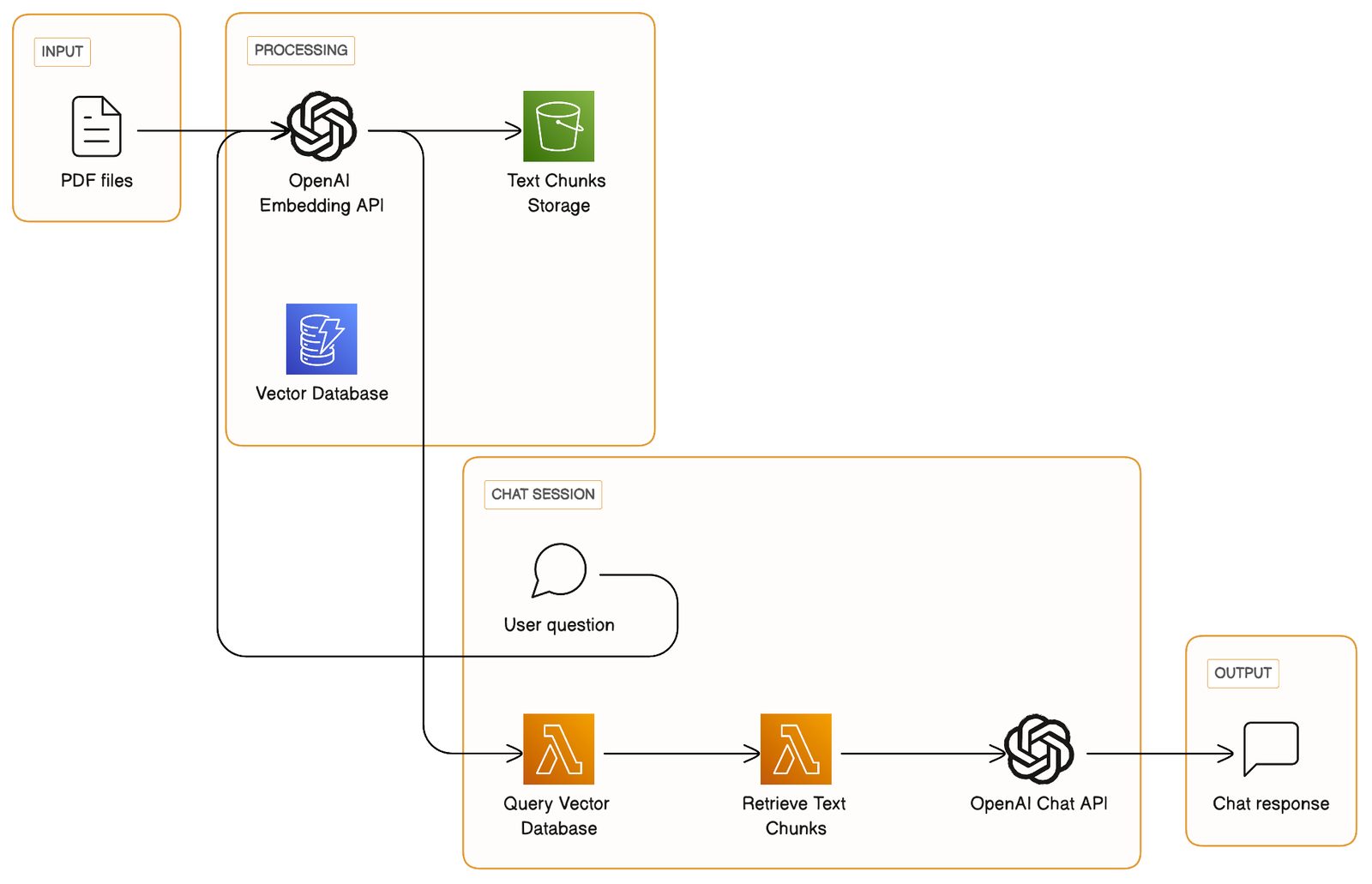
Chatbot architecture
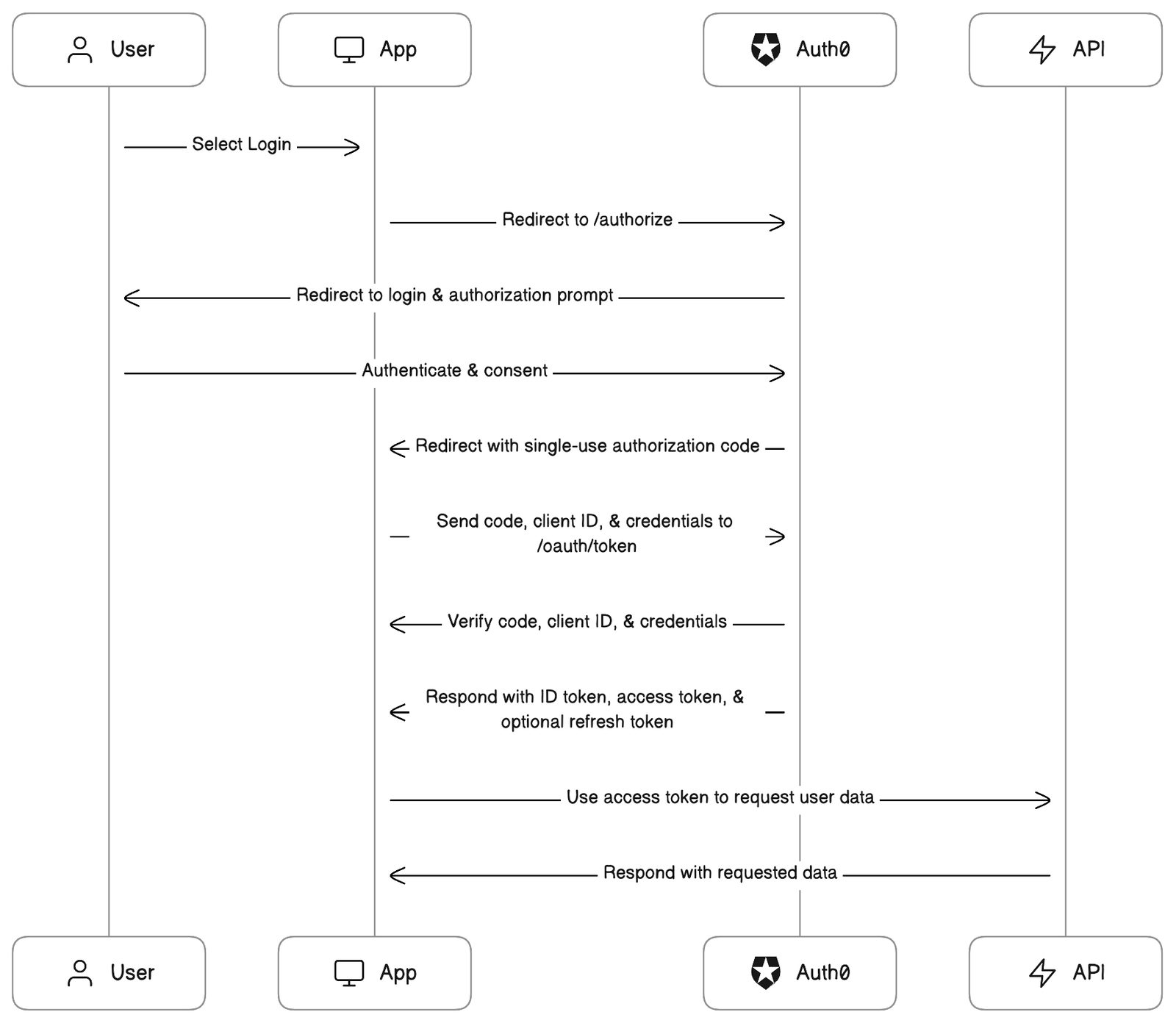
Auth0 auth flow
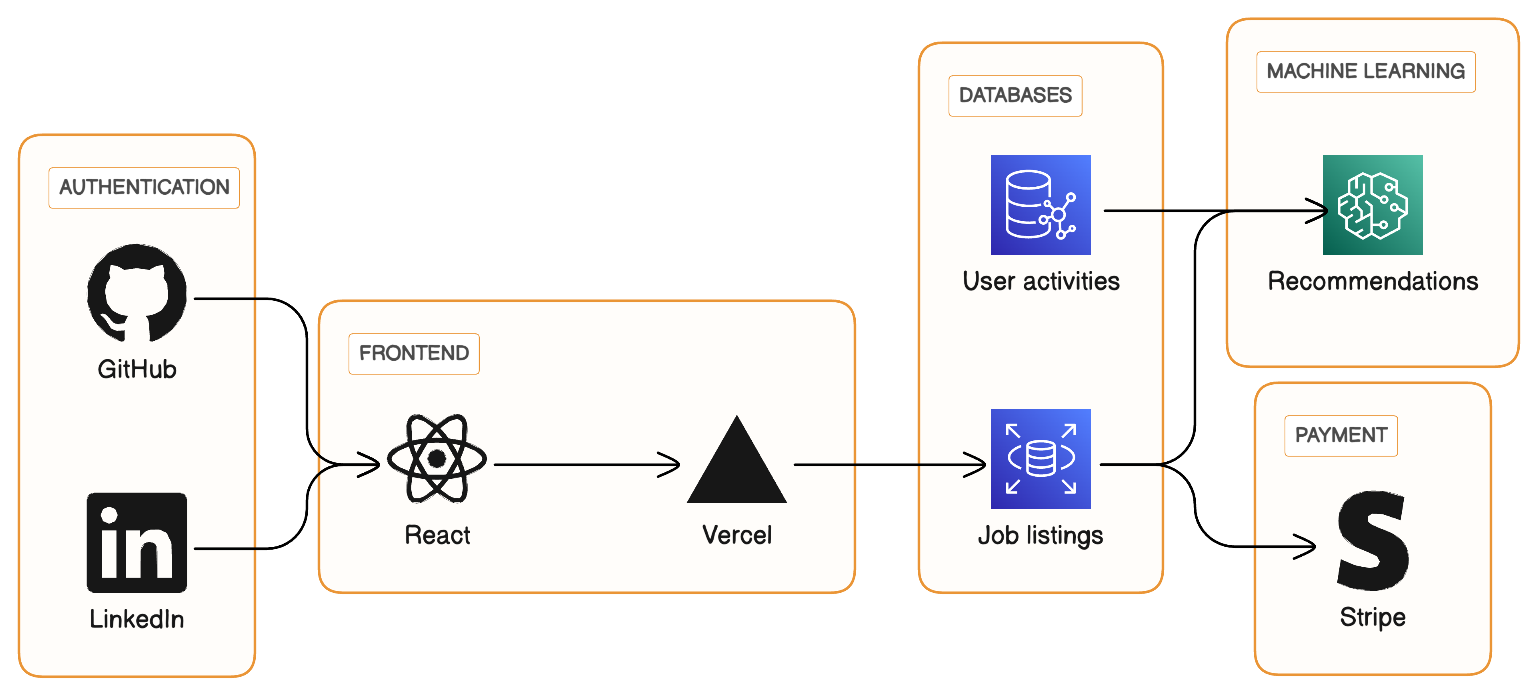
Gig marketplace architecture
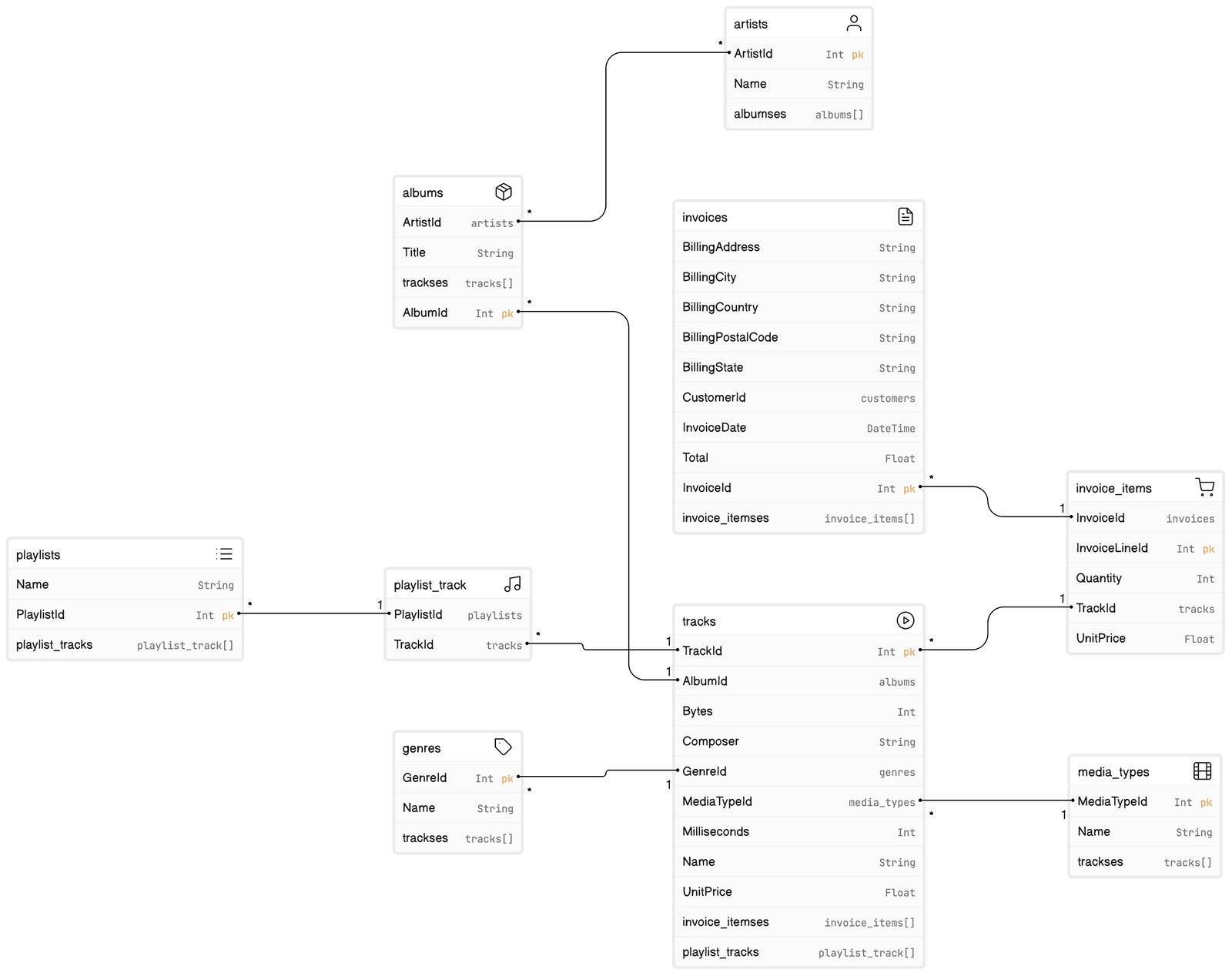
Music site Prisma schema
// Prisma schema

model albums {
  AlbumId  Int      @id
  ArtistId artists  @relation("albums_ArtistId_artists")
  Title    String
  trackses tracks[] @relation("albums_tracks_AlbumId", references: [AlbumId])
}

model genres {
  GenreId  Int      @id
  Name     String?
  trackses tracks[] @relation("genres_tracks_GenreId", references: [GenreId])
}

model artists {
  ArtistId Int      @id
  Name     String?
  albumses albums[] @relation("albums_ArtistId_artists")
}

model playlists {
  Name            String?
  PlaylistId      Int              @id
  playlist_tracks playlist_track[] @relation("playlist_track_PlaylistId_playlists")
}

model playlist_track {
  PlaylistId playlists @id(strategy: NONE) @relation("playlist_track_PlaylistId_playlists")
  TrackId    tracks    @id(strategy: NONE) @relation("playlist_track_TrackId_tracks")

  @@unique([PlaylistId, TrackId], name: "sqlite_autoindex_playlist_track_1")
}

model tracks {
  AlbumId         albums?          @relation("albums_tracks_AlbumId")
  Bytes           Int?
  Composer        String?
  GenreId         genres?          @relation("genres_tracks_GenreId")
  MediaTypeId     media_types      @relation("media_types_tracks_MediaTypeId")
  Milliseconds    Int
  Name            String
  TrackId         Int              @id
  UnitPrice       Float
  invoice_itemses invoice_items[]  @relation("invoice_items_TrackId_tracks")
  playlist_tracks playlist_track[] @relation("playlist_track_TrackId_tracks")
}

model invoices {
  BillingAddress    String?
  BillingCity       String?
  BillingCountry    String?
  BillingPostalCode String?
  BillingState      String?
  CustomerId        customers
  InvoiceDate       DateTime
  InvoiceId         Int             @id
  Total             Float
  invoice_itemses   invoice_items[] @relation("invoice_items_InvoiceId_invoices")
}

model invoice_items {
  InvoiceId     invoices @relation("invoice_items_InvoiceId_invoices")
  InvoiceLineId Int      @id
  Quantity      Int
  TrackId       tracks   @relation("invoice_items_TrackId_tracks")
  UnitPrice     Float
}

model media_types {
  MediaTypeId Int      @id
  Name        String?
  trackses    tracks[] @relation("media_types_tracks_MediaTypeId", references: [MediaTypeId])
}
eCommerce SQL schema
// SQL schema creation script

CREATE TABLE CART
(
  ID INTEGER PRIMARY KEY NOT NULL,
  CUSTOMER_ID INTEGER NOT NULL,
  NAME VARCHAR(50) NOT NULL
);
CREATE TABLE CART_ITEM
(
  CART_ID INTEGER NOT NULL,
  PRODUCT_ID INTEGER NOT NULL,
  ITEM_QTY INTEGER NOT NULL,
  LAST_UPDATED TIMESTAMP DEFAULT CURRENT_TIMESTAMP() NOT NULL,
  PRIMARY KEY ( CART_ID, PRODUCT_ID )
);
CREATE TABLE CATEGORY
(
  ID INTEGER PRIMARY KEY NOT NULL,
  NAME VARCHAR(50) NOT NULL,
  DESCRIPTION CLOB
);
CREATE TABLE CUSTOMER
(
  ID INTEGER PRIMARY KEY NOT NULL,
  NAME VARCHAR(100) NOT NULL,
  PASSWORD VARCHAR(20) NOT NULL,
  LAST_UPDATED TIMESTAMP DEFAULT CURRENT_TIMESTAMP() NOT NULL,
  REGISTRATION_DATE DATE DEFAULT CURRENT_DATE() NOT NULL
);
CREATE TABLE PRODUCT
(
  ID INTEGER PRIMARY KEY NOT NULL,
  NAME VARCHAR(50) NOT NULL,
  DESCRIPTION CLOB NOT NULL,
  PRICE DECIMAL(5,2) NOT NULL,
  STOCK_QTY INTEGER NOT NULL,
  LAST_UPDATED TIMESTAMP DEFAULT CURRENT_TIMESTAMP() NOT NULL,
  CATEGORY_ID INTEGER NOT NULL
);
ALTER TABLE CART ADD FOREIGN KEY ( CUSTOMER_ID ) REFERENCES CUSTOMER ( ID );
CREATE INDEX FK_CUSTOMERCART_INDEX_1 ON CART ( CUSTOMER_ID );
ALTER TABLE CART_ITEM ADD FOREIGN KEY ( CART_ID ) REFERENCES CART ( ID );
ALTER TABLE CART_ITEM ADD FOREIGN KEY ( PRODUCT_ID ) REFERENCES PRODUCT ( ID );
CREATE INDEX FK_CARTITEMPRODUCT_INDEX_B ON CART_ITEM ( PRODUCT_ID );
CREATE UNIQUE INDEX UNIQUE_NAME_INDEX_F ON CATEGORY ( NAME );
ALTER TABLE PRODUCT ADD FOREIGN KEY ( CATEGORY_ID ) REFERENCES CATEGORY ( ID );
CREATE INDEX FK_PRODUCTCATEGORY_INDEX_1 ON PRODUCT ( CATEGORY_ID );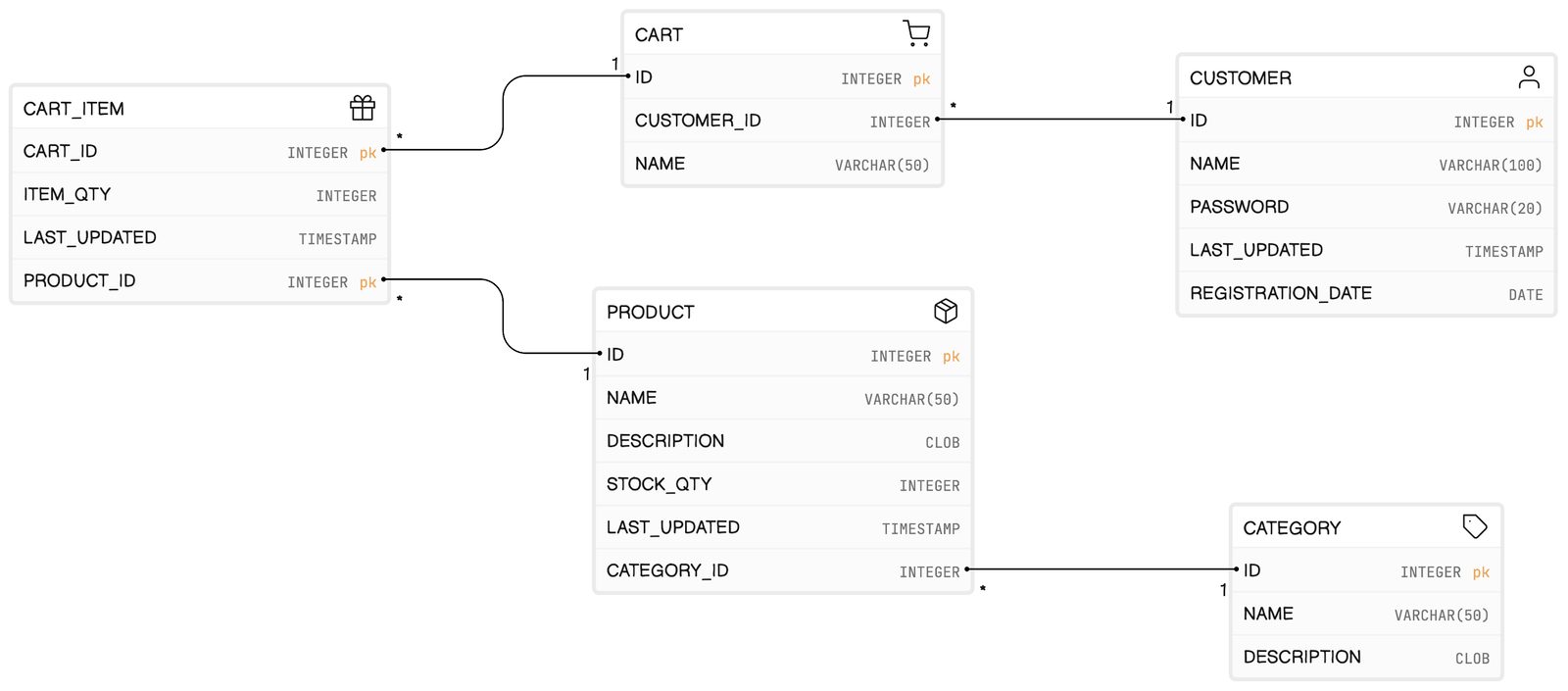
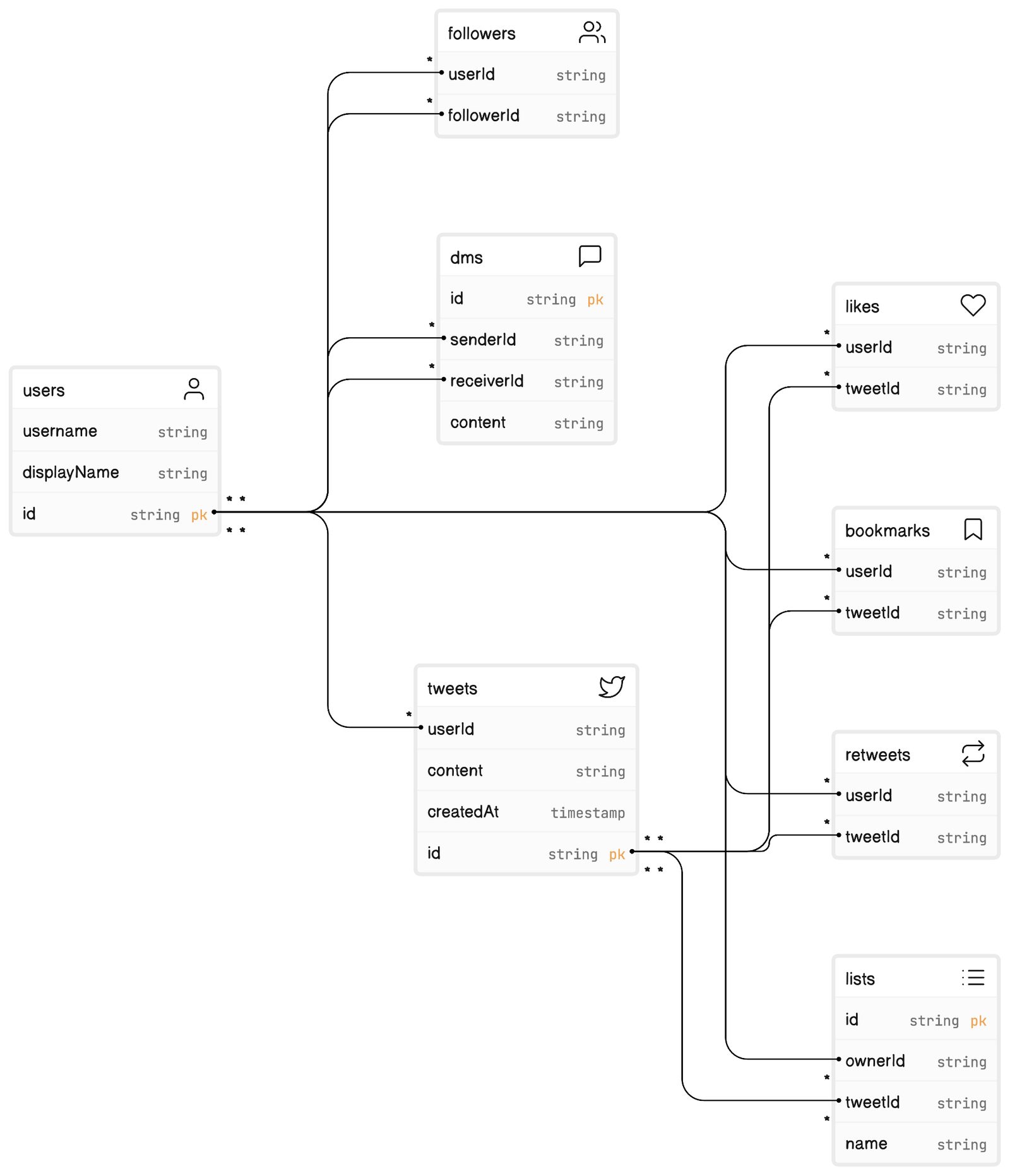
Twitter data model
GitHub Action
// source: https://github.com/google-github-actions/example-workflows/blob/main/workflows/deploy-cloudrun/cloudrun-docker.yml

    name: Build and Deploy to Cloud Run

    on:
      push:
        branches:
          - $default-branch

    env:
      PROJECT_ID: YOUR_PROJECT_ID
      GAR_LOCATION: YOUR_GAR_LOCATION
      REPOSITORY: YOUR_REPOSITORY_NAME
      SERVICE: YOUR_SERVICE_NAME
      REGION: YOUR_SERVICE_REGION

    jobs:
      deploy:
        permissions:
          contents: 'read'
          id-token: 'write'

        runs-on: ubuntu-latest
        steps:
          - name: Checkout
            uses: actions/checkout@v2

          - name: Google Auth
            id: auth
            uses: 'google-github-actions/auth@v0'
            with:
              token_format: 'access_token'
              workload_identity_provider: '${{ secrets.WIF_PROVIDER }}'
              service_account: '${{ secrets.WIF_SERVICE_ACCOUNT }}'
          - name: Docker Auth
            id: docker-auth
            uses: 'docker/login-action@v1'
            with:
              username: 'oauth2accesstoken'
              password: '${{ steps.auth.outputs.access_token }}'
              registry: '${{ env.GAR_LOCATION }}-docker.pkg.dev'
          - name: Build and Push Container
            run: |-
              docker build -t "${{ env.GAR_LOCATION }}-docker.pkg.dev/${{ env.PROJECT_ID }}/${{ env.REPOSITORY }}/${{ env.SERVICE }}:${{ github.sha }}" ./
              docker push "${{ env.GAR_LOCATION }}-docker.pkg.dev/${{ env.PROJECT_ID }}/${{ env.REPOSITORY }}/${{ env.SERVICE }}:${{ github.sha }}"
          - name: Deploy to Cloud Run
            id: deploy
            uses: google-github-actions/deploy-cloudrun@v0
            with:
              service: ${{ env.SERVICE }}
              region: ${{ env.REGION }}
              image: ${{ env.GAR_LOCATION }}-docker.pkg.dev/${{ env.PROJECT_ID }}/${{ env.REPOSITORY }}/${{ env.SERVICE }}:${{ github.sha }}
          - name: Show Output
            run: echo ${{ steps.deploy.outputs.url }}
Doctor onboarding flow