BPMN diagram examples
Here are some examples of BPMN diagrams you can create.
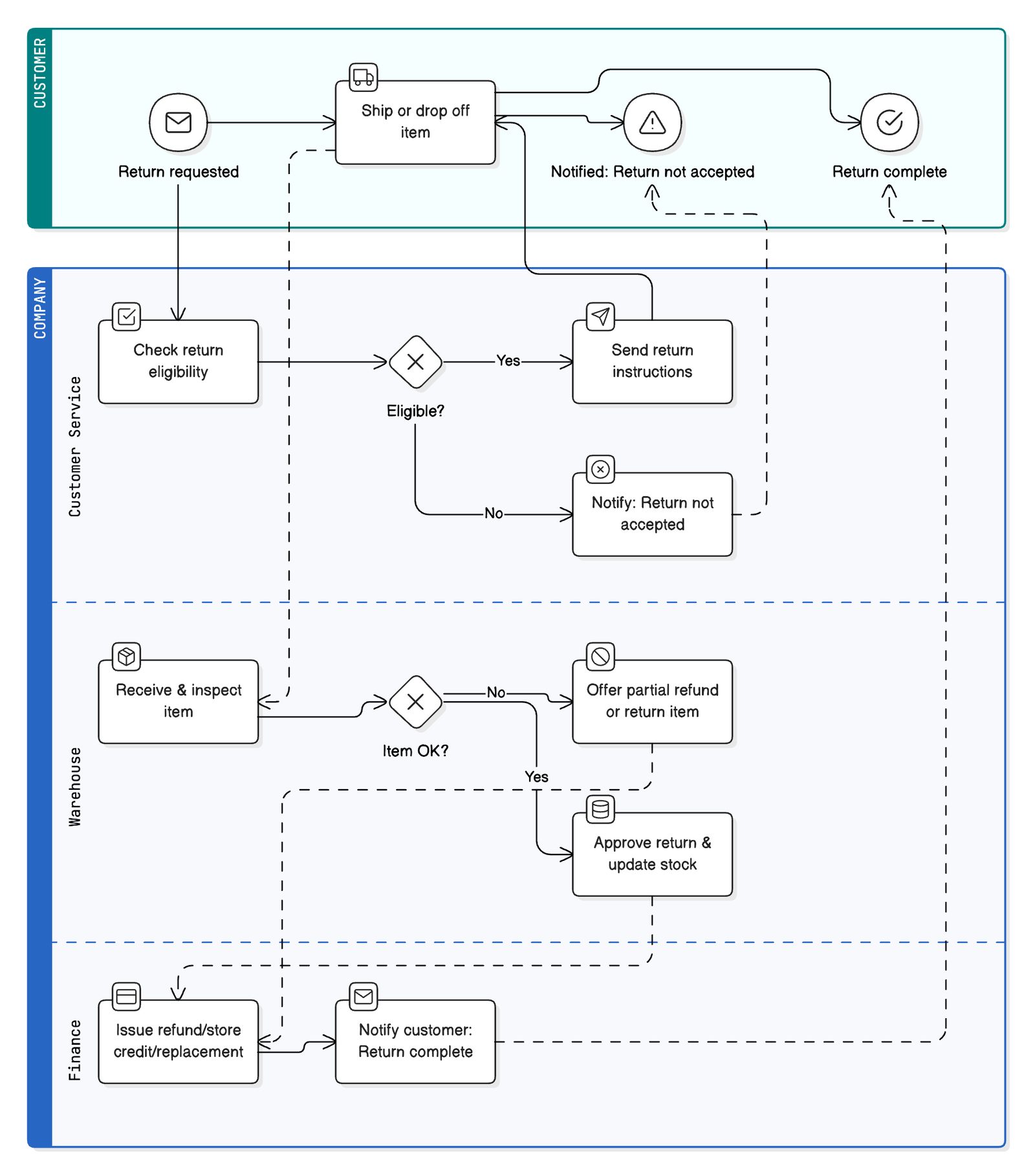
Expense Submission and Approval Flow
title Expense Submission and Approval Flow

User [color: lightblue] {
  Login [icon: log-in]
  Access confirmed [type: event, icon: check-circle]
  Start new expense report [icon: file-plus]
  Upload receipts [icon: upload]
  Reimbursed [type: event, icon: dollar-sign]
  User rejected [type: event, label: "Rejected", icon: x-circle]
}

System [color: orange] {
  OCR extract date & amount [icon: calendar]
  Check amount [type: gateway, icon: filter]
  "Auto-approve?" [type: gateway, icon: check]
  "Auto-approved" [type: event, icon: thumbs-up]
  Send to manager [icon: send]
  Process reimbursement [icon: credit-card]
}

Manager [color: green] {
  Review expense [icon: eye]
  Approve? [type: gateway, icon: check]
  Approved [type: event, icon: thumbs-up]
  Rejected [type: event, icon: x-circle]
}

// Connections within User pool
Login > Access confirmed
Access confirmed > Start new expense report
Start new expense report > Upload receipts

// User to System (dashed message flow)
Upload receipts -- OCR extract date & amount : Receipts

// System pool
OCR extract date & amount > Check amount
Check amount > "Auto-approve?" : Amount < $500
Check amount --> Rejected : Amount > $500

// Auto-approve gateway
"Auto-approve?" > "Auto-approved" : Amount < $50
"Auto-approve?" > Send to manager : $51–$500

// Auto-approved to reimbursement
"Auto-approved" > Process reimbursement

// Send to manager to Manager pool (dashed message flow)
Send to manager -- Review expense : Expense for approval

// Manager pool
Review expense > Approve?
Approve? > Approved : Yes
Approve? > Rejected : No

// Approved to System (dashed message flow)
Approved --> Process reimbursement : Approval

// Process reimbursement to User pool (dashed message flow)
Process reimbursement --> Reimbursed : Reimbursement
Upload receipts > Reimbursed

// Rejected to User pool (dashed message flow)
Rejected --> Reimbursed : Notify user
Upload receipts > User rejected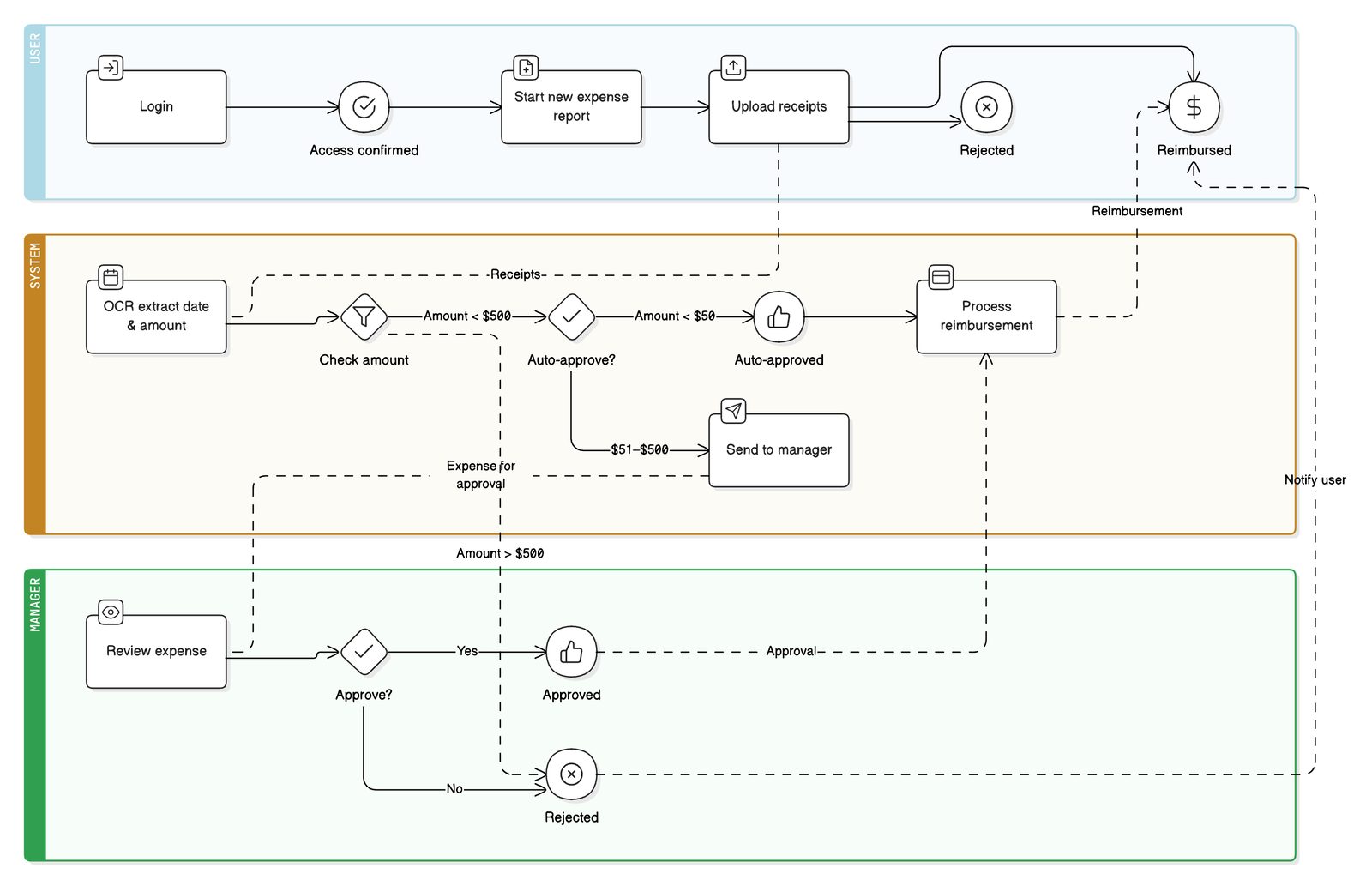
Product Returns Process
title Product Returns Process

Customer [color: teal] {
  Return requested [type: event, icon: mail]
  Ship or drop off item [icon: truck]
  Return complete [type: event, icon: check-circle]
  "Notified: Return not accepted" [type: event, icon: alert-triangle]
}

Company [color: blue] {
  Customer Service {
    Check return eligibility [icon: check-square]
    Eligible? [type: gateway, icon: x]
    Send return instructions [icon: send]
    "Notify: Return not accepted" [icon: x-circle]
  }
  Warehouse {
    Receive & inspect item [icon: package]
    Item OK? [type: gateway, icon: x]
    Offer partial refund or return item [icon: slash]
    Approve return & update stock [icon: database]
  }
  Finance {
    "Issue refund/store credit/replacement" [icon: credit-card]
    "Notify customer: Return complete" [icon: mail]
  }
}

// Connections

Return requested > Check return eligibility
Check return eligibility > Eligible?
Eligible? > Send return instructions : Yes
Eligible? > "Notify: Return not accepted" : No
"Notify: Return not accepted" --> "Notified: Return not accepted"
Return requested > Ship or drop off item
Send return instructions > Ship or drop off item
Ship or drop off item --> Receive & inspect item
Receive & inspect item > Item OK?
Item OK? > Approve return & update stock : Yes
Item OK? > Offer partial refund or return item : No
Offer partial refund or return item --> "Issue refund/store credit/replacement"
Approve return & update stock --> "Issue refund/store credit/replacement"
"Issue refund/store credit/replacement" > "Notify customer: Return complete"
"Notify customer: Return complete" --> Return complete
Ship or drop off item > Return complete
Ship or drop off item > "Notified: Return not accepted"